
Capitalization
1. Introduction
1.1 What is capitalization for us?
To reflect Turkish Airlines’ hospitality in the experience, we must handle capitalization with care. In what ways do we approach capitalization?
1.2 Principles
1.2.1 Consistency
It is standardized in every usage specific to each component to help users recognize and understand the text.
1.2.2 Readability
Text written entirely in uppercase, especially long sentences or paragraphs, can be difficult to read. Therefore, we generally prefer to use capital letters at the beginning of sentences and for proper nouns.
1.2.3. Emphasis and hierarchy
Capital letters can be used to emphasize certain text or create a hierarchy. However, this use is limited in our content design system. To view more about the title and sentence case hierarchies.
1.2.4 Natural language use
It is important to use a language that is close to the natural speech of users. Therefore, we do not use capital letters unnecessarily.
In summary, we do whatever the experience requires and approach the user in the manner that we should.
Let’s begin with the basics.
2. Basic terms
2.1. Title case
It refers to text where nearly all words begin with a capital letter. This style is commonly used for titles.
2.2. Sentence case
When only the first letter of the first word is capitalized, along with any proper nouns, similar to how you would write a regular sentence.
2.3 Proper nouns and branded terms
Should be written by starting a capital letter.
2.4. First word of a title or heading
Capitalize the first words even if it is a minor word such as “The”, “A” or “An”.
2.5. Minor Words
When using title case, lowercase minor words that are three letters or fewer, except for the first word in a title or subtitle, or the first word after a colon, em dash, or end punctuation in a heading.
- Short conjunctions (e.g., “and,” “as,” “but,” “for,” “if,” “nor,” “or,” “so,” “yet”)
- Articles (“a,” “an,” “the”)
- Short prepositions (e.g., “as,” “at,” “by,” “for,” “in,” “of,” “off,” “on,” “per,” “to,” “up,” “via”)
3. Why we prefer to use sentence case?
We have valid reasons for minimizing the use of capital letters and opting for sentence structure:
3.1. Facilitating localization
We aim to provide an inclusive experience for our users worldwide. For a product available in 16 languages, this approach is essential.
3.2. Reflecting our hospitality
We communicate with each of our guests in a soft, polite, and respectful tone. When we use uppercase (ALL CAPS), our sole purpose is to ensure easy navigation for the user. Guiding them correctly within the product is our top priority.
3.3. Increasing usability
In our mobile and digital products, we must present a content-heavy design. We foresee that scannable, readable, and understandable content will also increase usability.
3.4. Keep users in the same story
We strive to create all our pages consistently, giving the user the feeling that they are always reading the same story and having similar experiences.
4. Fields of usage
Capitalization guidelines vary based on content type and emphasis needs, with two main options: sentence case and title case. For a quick overview of the differences, check above.
Context is crucial when choosing the capitalization style. Web pages, app, blog and etc. each serve different purposes, and how a heading interacts with other creative elements can determine its capitalization. Please review also the use of titles, headings and body copies.
Here is the suggestions in components.
4.1. Buttons
Write the buttons in sentence case.


4.2. Headings
Write the headings in sentence case.


4.3. Email address or website URL
When writing out an email address or website URL, use all lowercase.
Before visiting Türkiye, you can obtain an e-visa at www.eVisa.gov.TR/ website.
Before visiting Türkiye, you can obtain an e-visa at www.evisa.gov.tr/ website.
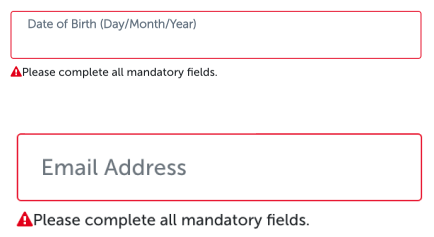
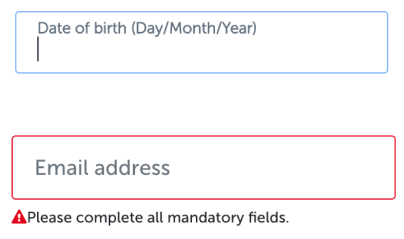
4.4. Input placeholders
Design all input placeholders in sentence case.
4.5. Mega menu
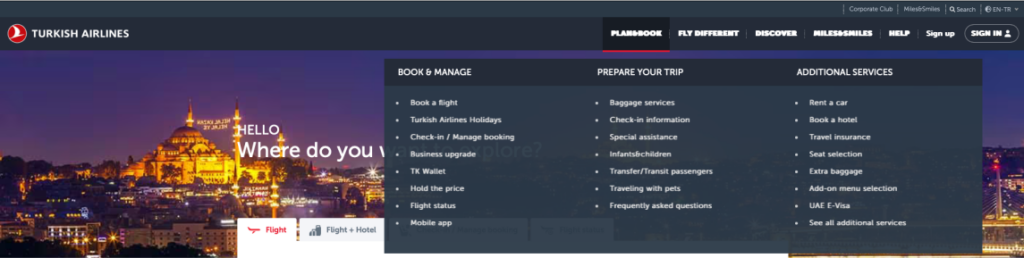
To enhance the noticeability of our users, we prefer using UPPERCASE titles in the HEADER, h and MEGA MENU. These titles are all accompanied by sub-header buttons, which are also written in UPPERCASE. As you can view below, the mega menu hierarchies are written from top to bottom as follows:
- ALL CAPS headers (e.g. FLY DIFFERENT)
- ALL CAPS titles (e.g. BOOK & MANAGE)
- Sentence case titles (e.g. Book a flight)
4.6. Footers
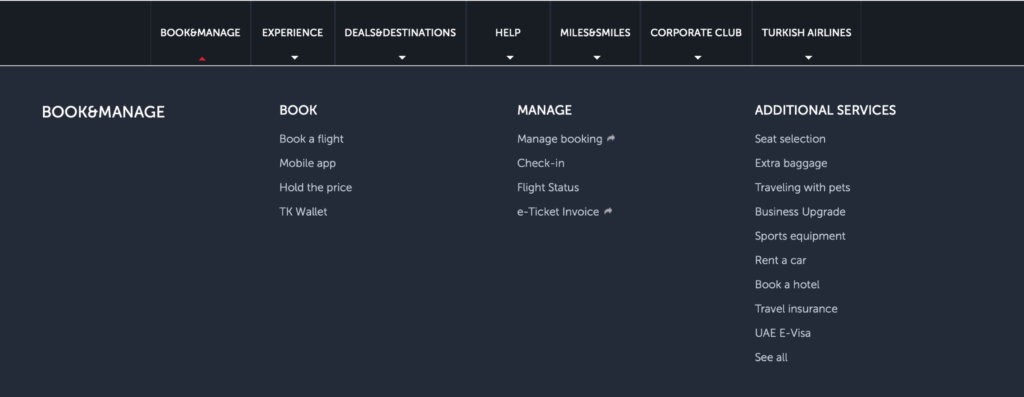
Buttons in headers, footers, and mega menus, which consist of tabs and facilitate navigation, should always be written by following a hierarchy below. Our primary goal with these components is to simplify navigation, increase interaction, and provide clear guidance to the user.
- ALL CAPS headers (e.g. EXPERIENCE)
- ALL CAPS titles (e.g. ADDITIONAL SERVICES)
- Sentence case titles (e.g. Manage booking)
4.7. Passenger names
The fluctuant nature of dynamic components should not deter us from standardizing. For this reason, we must adopt consistency as our principle in all circumstances.
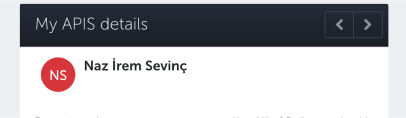
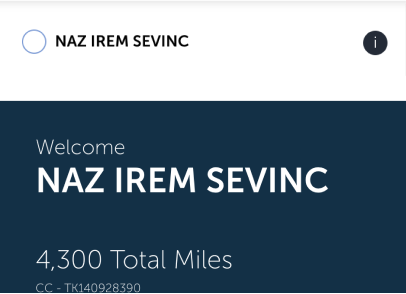
The differences in letters and characters across world languages can make our work quite challenging. There are numerous letters adapted to different languages, such as ‘ç’, ‘č’, ‘ş’, ‘æ’, etc. which can potentially be used by users filling out dynamic fields.
However, a user with a Turkish name may not find the equivalent letter when in Denmark. Therefore, the capitalized forms of Latin letters found in global English, which are widely known and used by many people, should be used in passenger names.
4.8. Airplane types
Airplane types are also written in UPPERCASE to make them stand out from the other information in the component.

4.9. Addressing
Addressing the passenger according to their gender is important not for any particular stance but to help us calculate the average load of the plane. During ticketing, we record the gender in the system and use it to calculate an estimated weight. The user can also see this form of address on their interface.
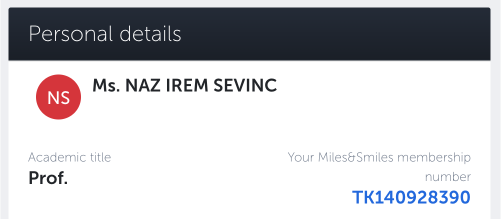
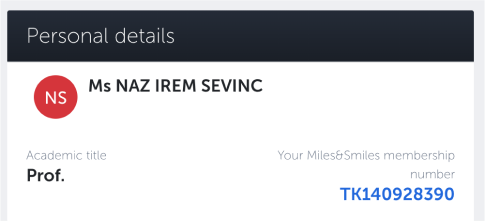
’Mr.’ and ‘Ms.’ titles should be written in full compliance with grammar rules, using a period and within sentence case.
Additionally, passengers can add their academic titles. Academic titles should also be written following grammar rules, such as ‘Prof.’ and ‘Ph.D.’ You can use artificial intelligence tools to ensure proper grammar rules.
5. Abbreviations
We include abbreviations in Horizon as needed. Please review also the use of abbreviations.
When capitalizing them here are the rules you should follow. You must display international abbreviation codes in ALL CAPS for better visibility and easier scanning. Use hyphens to separate them
5.1. Code abbreviations
Write all port code abbreviations in capital letters
AYT
SAW
IST
BCN
5.2. Currencies
Use capital letters when you are writing currencies.
TRY
EUR
USD
5.3. Country/region and language
In the language section, use capital letters for both country/region and language section.
EN-INT
TR-TR
5.4. Day and month
We do not recommend abbreviating the days due to the inclusivity, they may be abbreviated in tables, lists, or certain specific formats where space is limited. Use three letters without a period.
Mon
Tue
Wed
5. Punctuation usage
Punctuation marks and capital letters greatly influence each other, almost like they are dancing together within the text. The rules for when they are used together are as follows.
- If you are writing a sentence that ends with a punctuation mark, use sentence case regardless of where you wrote it.
- Capitalize the first word after a colon and em dash. Avoid capitalizing the first word after a hyphen and en dash.
Touristanbul: An amazing experience!
For a brand-new story: purchase a plane ticket now
- End the sentence with only exclamation point or question mark in headings, if needed. Don’t use periods in headings.
The sixth continent: Australia
Unlock exclusive Miles&Smiles benefits!
7. Special occasions
Miles is a concept specific to Turkish Airlines thats why the word ’’Miles’’ is a proper noun. It is used the same in every language except Turkish. Please use “Mil” for singular and “Miller” for plural in Turkish.