
Date and Time
1. Introduction
1.1. How to display dates and times in Horizon
Since we fly to many parts of the world, we need to stay live 24/7. Therefore, the display of time is a very sensitive issue for us. As much as the design allows, we must show the most inclusive expression without panicking the user. Below are the date and time formats used in Turkish Airlines mobile and digital products.
1.1.1. Date formats
- Only the date
- The date and the day
- Abbreviated dates
- Abbreviated the date and the day
- Input placeholders
1.1.2. Time formats
- 12-hour and 24-hour
- Only time
- Time range
- Date and time
- Flight duration
- GMT, UTC and Local time
2. Date formats
2.1. Date formatting
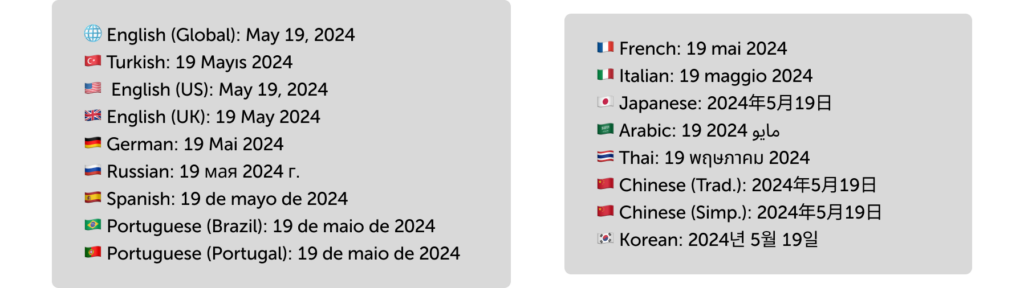
We typically write dates within sentences. Regardless of the context, we adhere to the AP Style’s recommended format of Month-Day-Year. The key aspects of this format include placing a comma after the day and omitting a space before the year. If you write it for a specific language and region please view the dates in all languages.

2.1.1. Dates in all languages
Here is the suggested formats.
2.2. Date and day formatting
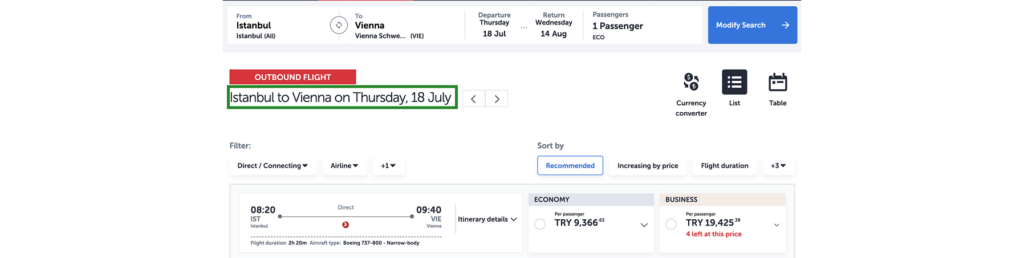
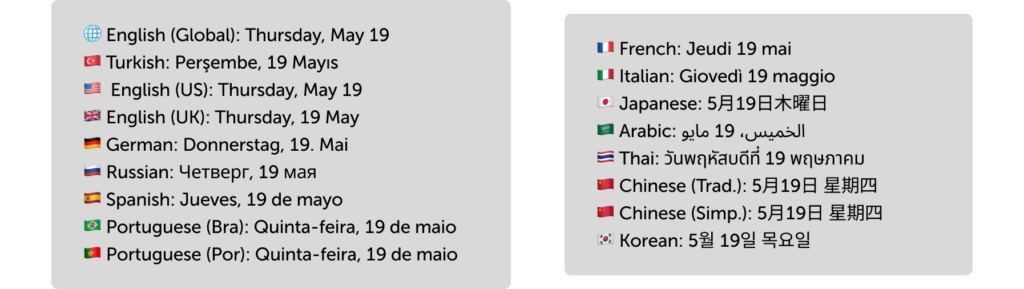
In certain dynamic blocks where flights are displayed, we also require the day along with the date. When presenting the day and date, write the day clearly, separate it from the date with a comma, and omit the year due to space constraints. While including the year would be more comprehensive, we assume that users are aware of the current year.
2.2.1. Date and day in all languages
Here is the suggested formats.
2.3. Abbreviated date formatting
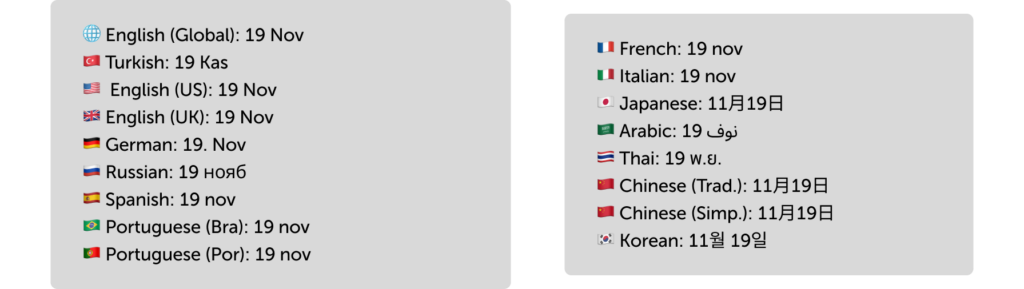
Due to the presence of numerous labels in dynamic blocks, date formats can sometimes be abbreviated. In such instances, prioritize displaying the day of the month when the user reserved their seat. Subsequently, abbreviate the month using only three letters.

2.3.1. Abbreviated date in all languages
Here is the suggested formats.
2.4. Abbreviated date and abbreviated day formatting
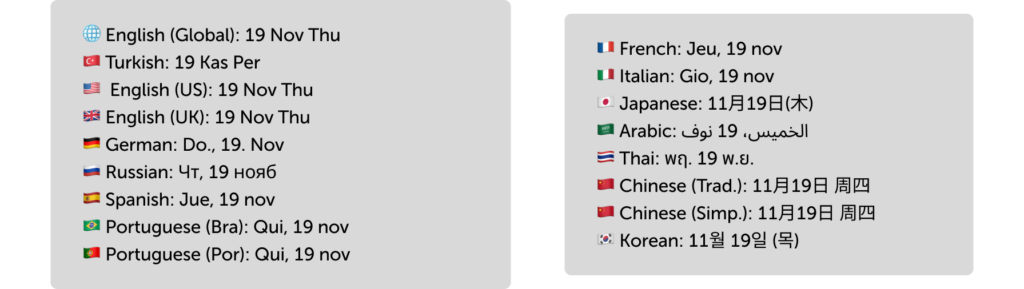
In limited spaces like ticket details encountered just before purchase, you may have the need to convey information concisely. In such cases, feel free to utilize the current day, the three-letter abbreviation for the month, and the three-letter abbreviation for the day.

2.4.1. Abbreviated date and abbreviated day in all languages
Here is the suggested formats.
2.5. Input placeholders
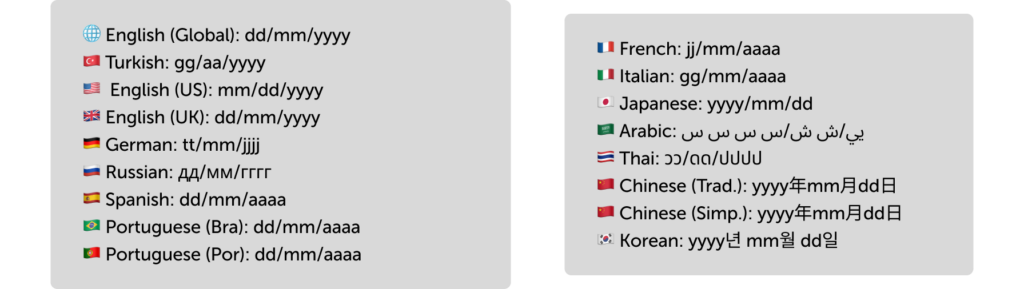
Input placeholder texts serve as key indicators to present entering a date format.
2.5.1. Input placeholders in all languages
Here is the suggested formats.
3. Time formats
3.1. 12h and 24h
Since time is crucial for the experience we offer, we align with the time format that our users have set on their operating system. You can find the ideal representations for 12-hour and 24-hour formats below.
8:30 AM
11:59 PM
08:30
23:59
The reason we use the Chicago Manual of Style for 12-hour spellings is because time displays are often written in smaller fonts. We use UPPERCASE to enhance scannability and visibility.
3.2. Time formatting
Time formatting is especially important for departure and arrival times. The backend development automatically separate independent elements with a pipe (|). So you don’t require to do anything. But on the other hand, regardless of the format, you should separate with a colon (:) when writing the hours and minutes.

3.3. Time ranges
For time ranges, feel free to use the three-letter abbreviations for the month and day of the week.

3.4. Date and time together
Please keep in mind that the backend system always separate them with a pipe (|). You don’t require to do anything.

If you need to write the date and time within a sentence, it’s not a common scenario, but if it happens, follow the rules for writing dates in a sentence and separate the time with a comma, since it’s an independent element.
The flight from Istanbul to London scheduled for 31/03/24 at 17:30 has been canceled due to bad weather.
Istanbul – London flight on Wednesday, March 31, 2024, at 5:30 PM has been canceled due to adverse weather conditions.
3.5. Flight duration
Flight durations are a common concern for our passengers. Write them clearly and understandably in extensive texts like subtexts. However, you won’t have much space in dynamic blocks.
In this case, use single-letter abbreviations: “h” for hours and “m” for minutes. Although leaving out spaces breaks grammar rules, using bold font will enhance readability.
If there’s a common two-letter abbreviation for hours and minutes in the local language, use it. For example, in Turkish, “d” doesn’t mean anything to users, so we use “dk” for minutes. Consult a local content designer or use AI to learn the common usage in that culture.

3.6. GMT, UTC and Local time
GMT is based on solar time and is a commonly used standard. UTC, on the other hand, is based on atomic time and is very precise. In international aviation standards, UTC is used.
However, UTC might not mean much to our users. That’s why we, at Turkish Airlines, highlight departure and arrival times in the local time of the relevant country/region/city.
This approach also covers large countries that use multiple time zones. If you’re creating content for Turkish Airlines, focus on the departure and arrival points first, then strive to show the local time.